

Founder of Chatwith
How to improve your Chatwith Agent responses
So you've got an agent. Cool! But let's be real, fresh-off-the-press agent doesn't always give the perfect response. You might find your agent giving answers that are a bit off, or a tad too wordy. Fine-tuning your agent's responses can feel like a Herculean task, especially if you're not a machine learning expert.
Why fine-tuning your Chatwith Agent is important
Before we dive into the "how", let's talk about why you should even bother with fine-tuning:
- Accuracy: You want your agent to provide the best answers, not just any answers.
- User Experience: A well-tuned agent makes for a smoother, more enjoyable user experience.
- Business Goals: Whether it's lead generation or customer support, a fine-tuned agent aligns better with your objectives.
The challenge of fine-tuning agents
Some agent-builder platforms offer a way to control the way your agent answers, but it's often buried in a maze of options and settings. You'll need to create intents, long chains of "if this then that" or even worse - whole graphs of different paths the conversation can go. It's a process, and it's not just about feeding the bot a new answer; it's about retraining the whole model to understand the context better. Sounds like a lot, right?
Fine-tuning your Chatwith Agent in Chatwith
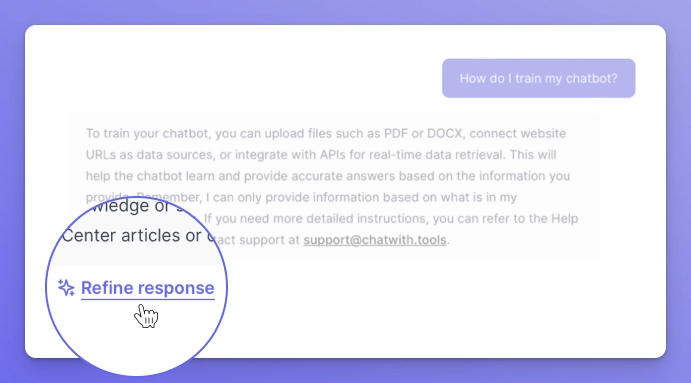
If you're using Chatwith, fine-tuning your AI agent is as straightforward as it gets. Here's how:
- Go to the Dashboard: Log in and head over to the Conversations section.
- Pick a Conversation: Find a question where you think the agent could've done better.
- Click "Refine Answer": It's right there under the agent's response.
- Update and Save: Type in the answer you'd prefer, hit Save, and you're done.
That's it. No digging through settings, no complex retraining. Your agent will now use this refined answer for similar questions. You can even manage all your refinements in a dedicated section, called... exactly, Refinements!
Check our Help Center guide to learn more about using Chatwith Refinements.
General tips
If you're not on Chatwith or just want some general advice, here are two tips for making sure your agent gives the best replies:
- Review: Regularly review the questions and answers to identify gaps. Checking your agent conversation log is a great way to not only improve the agent itself, but also learn what your website visitors want to know about your business!
- Iterate: Fine-tuning is not a one-time task. Keep iterating to make your agent smarter. This is especially true if your business evolves - for example, make sure your agent is up to date with the new features.
Wrapping up
Fine-tuning an agent can be a daunting task, but it doesn't have to be. With Chatwith, it's a walk in the park. So go ahead, make your agent the best it can be. Your users will thank you.
More from our blog

FAQ Agent: How to Add AI-Powered Q&A to Your Website (2026)
Learn what an FAQ agent is, how it works, and how to add one to your website in minutes — no coding required. Turn your static FAQ into an interactive AI assistant.

How to improve e-commerce customer support with a Chatwith Agent
Customize ChatGPT for e-commerce to offer 24/7 support, personalized interactions, and reduce costs, while improving the online shopping experience.